




The WooCommerce vs Shopify debate is one of the most searched ecommerce decisions online, and for good reason. Pick the wrong platform and you pay for it twice: once in setup costs, and again when you eventually migrate. Both platforms power millions of stores worldwide, but they serve very different types of business owners.
This guide cuts through the noise. By the end, you’ll know exactly which platform fits your goals, your budget, and where your business is heading in the next 12–24 months. If you’re building your first online store, the wrong choice can cost you time, money, and growth opportunities. This breakdown helps you decide with confidence.
The Real Decision: Control vs Convenience
Before comparing features, understand what you’re actually choosing between.
Shopify is a fully hosted SaaS platform. Hosting, security, updates, and performance are all managed for you. You log in, build your store, and sell, without touching a server.
WooCommerce is a free plugin that runs on WordPress. You own the hosting, you handle updates, and you control every line of code. That freedom is powerful, but it comes with responsibility.
This core difference shapes everything else: cost structure, SEO potential, customisation depth, and long-term scalability. If you’re still weighing the broader decisions around building and structuring an online store, our breakdown of ecommerce website development covers what goes into building and scaling one effectively.
WooCommerce vs Shopify: Side-by-Side Comparison
| Feature | WooCommerce | Shopify |
| Platform Type | Self-hosted WordPress plugin | Fully hosted SaaS |
| Ease of Setup | Moderate | Very easy |
| Customisation | Full control | App-based only |
| Pricing | Variable | Fixed monthly plans |
| Transaction Fees | None (gateway-dependent) | Extra unless using Shopify Payments |
| SEO | Advanced | Good but limited |
| Performance | Hosting-dependent | Managed and optimised |
| Security | User-managed | Fully managed |
| Data Ownership | Full control | Platform-controlled |
Setup and Getting Started
Getting live looks very different on each platform.
Shopify lets you create an account, pick a theme, add products, connect payments, and launch, sometimes in a single afternoon. There’s no server to configure or plugin stack to manage.
WooCommerce requires more steps upfront: purchasing hosting and a domain, installing WordPress, activating the WooCommerce plugin, choosing a theme, and adding plugins for features like subscriptions or advanced shipping. Setup takes longer, but what you gain is a store built exactly to your specifications from day one.
For businesses focused on content marketing or long-term SEO, the WordPress foundation alone makes that extra setup time worthwhile. For those who simply want to start selling fast, Shopify removes the friction entirely. Either way, avoiding common website development mistakes from the start saves significant rework down the line.
True Cost Breakdown: What You’ll Actually Pay
Pricing is where most comparisons mislead you. Neither platform is universally cheaper, it depends entirely on your setup and scale.
Shopify Pricing
Shopify’s official pricing page includes:
- Monthly plan fees: Basic, Shopify, and Advanced tiers
- Transaction fees of 0.5–2% when using third-party payment gateways instead of Shopify Payments
- Paid apps, which add up fast, many core features require monthly subscriptions
- Premium themes, typically $150–$400 one-time
WooCommerce Pricing
- Hosting: anywhere from $10/month on shared hosting to $100+/month for managed WordPress hosting
- Domain name: approximately $10–$20/year
- Premium plugins: many are free, but paid extensions for subscriptions, memberships, or advanced SEO add up
- The core WooCommerce plugin is free
In practice: a basic Shopify store at the entry plan costs around $39/month before apps. A comparable WooCommerce store on quality managed hosting can run $25–$50/month. As stores scale and add apps, Shopify costs tend to rise faster. WooCommerce cost growth is more within your control.
SEO and Long-Term Organic Growth
If organic search is a meaningful acquisition channel for your business, this section matters more than any other.
WooCommerce wins on SEO depth. Built on WordPress, the world’s most SEO-friendly CMS, it gives you full control over URL structures, metadata, canonical tags, schema markup, and page speed optimisation. Plugins like Yoast SEO and Rank Math provide granular control that Shopify simply can’t match. The native blogging capability means content marketing and ecommerce live in the same ecosystem, which compounds SEO results over time. Pair that with a solid step-by-step SEO strategy and the compounding effect becomes hard to replicate on any other platform.
Shopify’s SEO is solid but constrained. You can optimise titles, meta descriptions, and alt text. However, URL structures are less flexible (the /collections/ and /products/ path format can’t be changed), blog functionality is basic, and many advanced SEO features require paid apps. For stores that rely primarily on paid ads or social commerce rather than organic search, these limitations are less significant. If paid acquisition is your main channel, understanding how paid advertising fits your strategy is worth thinking through alongside your platform choice.
Customisation: How Far Can You Go?
Every growing store eventually needs something the default setup doesn’t offer.
Shopify’s customisation works through its theme editor and app marketplace. The experience is clean and user-friendly, but you have no access to backend files. What you can build is limited to what apps and theme sections allow. For most standard stores, this is more than enough. For stores needing complex subscription tiers, custom checkout logic, or heavily tailored user experiences, it becomes a ceiling.
WooCommerce’s customisation has no ceiling. You can modify any file, build custom functionality, swap hosting providers, and integrate with virtually any third-party system. If your store requires advanced membership structures, complex B2B pricing rules, or a completely custom checkout flow, WooCommerce gives you the room to build it. This is why agencies and developers who work on complex ecommerce solutions almost always default to WooCommerce for custom builds.
Performance and Security
Shopify handles performance and security at the infrastructure level. CDN delivery, SSL certificates, automatic updates, and DDoS protection are all included. You don’t think about them.
WooCommerce performance is only as good as your hosting. On quality managed WordPress hosting, WooCommerce stores can match or outperform Shopify on Core Web Vitals metrics. On cheap shared hosting, performance suffers badly. Poor performance doesn’t just frustrate visitors, it directly affects rankings and revenue, which is why website speed is one of the highest-leverage areas to get right early.
The same principle applies to security, WooCommerce requires active management: plugin updates, malware scanning, regular backups, and firewall configuration. Neglect any of these and you create vulnerabilities. Following a proper website maintenance checklist covers most of the ground that Shopify handles automatically. For store owners who want to focus on sales rather than technical maintenance, Shopify’s managed approach is a genuine advantage.
Payment Flexibility
Payment choice matters, especially for international sellers and high-volume stores.
Shopify actively steers merchants toward Shopify Payments, its own payment processor. If you use a third-party gateway, you pay an additional 0.5–2% transaction fee on every sale, depending on your plan. At volume, this adds up to a meaningful cost.
WooCommerce supports a wide range of payment gateways, Stripe, PayPal, Square, regional processors, with no forced transaction fees. You pay standard gateway processing rates and nothing more. For high-volume stores, this flexibility can make a real difference in overall profitability.
Who Should NOT Use Each Platform
Avoid Shopify if:
- SEO and content marketing are your primary growth channels
- You need deep customisation or custom checkout logic
- You’re running a high-volume store and want to avoid extra transaction fees
- Long-term data portability and platform independence matter to you
Avoid WooCommerce if:
- You have no technical experience and no developer on hand
- You want to launch quickly without managing hosting or plugins
- You prefer predictable, all-inclusive monthly costs
- Server maintenance and security updates aren’t something you want to think about
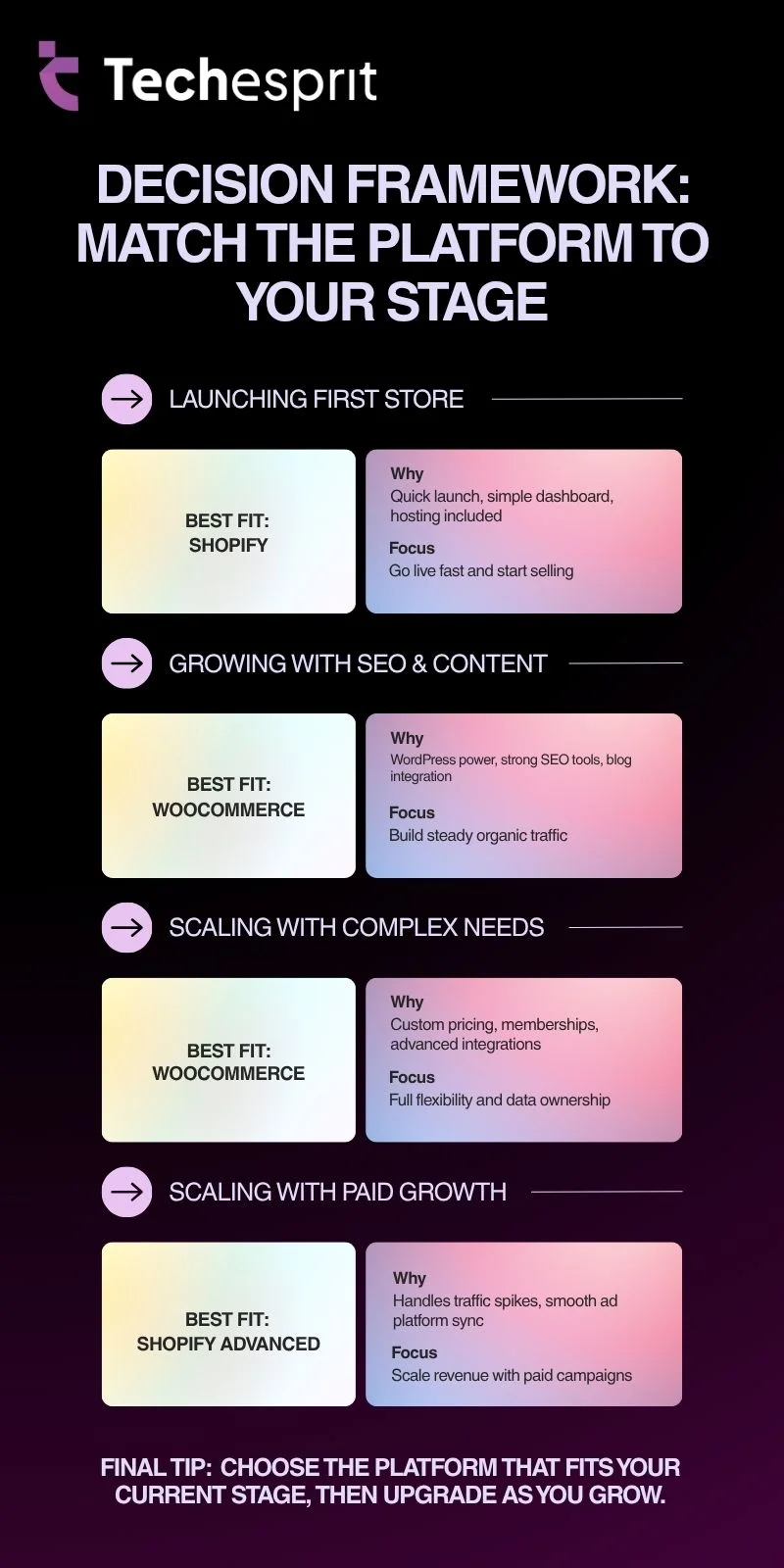
Decision Framework: Match the Platform to Your Stage
Conclusion
The WooCommerce vs Shopify decision isn’t about which platform is better, it’s about which one fits the business you’re building.
Choose Shopify if you want simplicity, managed infrastructure, and a fast path to your first sale. Choose WooCommerce if you want ownership, SEO depth, and the flexibility to build a store that grows on your terms, with the understanding that more control means more ongoing effort.
Think about where your business needs to be in 24 months, not just where it is today. That answer usually makes the decision clear.
FAQs
Is WooCommerce free to use?
The WooCommerce plugin itself is free. However, you’ll need to pay for hosting, a domain, and potentially premium plugins or themes. Total costs vary widely based on your setup.
Does Shopify charge monthly fees?
Yes. Shopify plans start at $39/month for Basic, $105/month for the Shopify plan, and $399/month for Advanced (billed monthly). Annual billing offers a discount.
Can I migrate from Shopify to WooCommerce?
Yes. Tools like Cart2Cart and LitExtension handle product, customer, and order data migration. It requires careful planning, especially for SEO URL redirects, but is entirely achievable.
Which is faster, WooCommerce or Shopify?
Shopify is faster out of the box. WooCommerce on quality managed hosting can match or beat Shopify speeds, but requires deliberate optimisation.
Which platform is better for subscriptions?
WooCommerce, due to its flexible plugin ecosystem. Plugins like WooCommerce Subscriptions give granular control over billing cycles and trial periods. Shopify relies on third-party apps that often add ongoing costs with less flexibility.
What happens when your store outgrows the platform?
WooCommerce scales flexibly since you control hosting and features. Shopify also scales, but often requires plan upgrades and additional paid apps as needs grow.