A WordPress website can be surprisingly easy to launch. You can purchase hosting, install WordPress, select a theme, add a few plugins, create your pages, and have something online within a short time.
That simplicity is one of WordPress’s biggest strengths.
It can also become one of its biggest weaknesses when a business assumes that getting a website online and developing a website for a business are the same thing.
They are not.
Once a website starts generating leads, processing orders, connecting with a CRM, managing customer accounts, publishing large amounts of content, or supporting internal business processes, the decisions behind the website become much more important.
The question is no longer simply:
“Can WordPress build this website?”
It becomes:
“Can WordPress be developed in a way that makes this website reliable, maintainable, secure, and useful for the people who depend on it?”
That is what modern WordPress development is really about.
What Is WordPress Development?
WordPress development is the process of building, customizing, extending, integrating, testing, and maintaining a website or web application using WordPress.
That definition is broader than simply designing a website.
A developer might create a custom theme for a company that needs a completely tailored interface. Another project might require a custom plugin that connects WordPress with a CRM. An ecommerce business might need WooCommerce connected to its inventory and shipping systems. A larger organization might use WordPress as a headless content management system while a separate frontend handles what visitors see.
So when someone searches for WordPress web development, they could actually be looking for very different things.
- They may need a new website.
- They may need to rebuild an existing website.
- They may need custom functionality.
- They may need an integration.
- They may need to fix a slow or unstable website.
Or they may simply need someone who understands how to make WordPress work around the way their business operates.
That distinction matters because the right development approach depends on the problem, not on the label attached to the project.
WordPress Development vs Website Development
Website development is the broader discipline of building websites and web applications.
It can involve WordPress, Shopify, Webflow, Laravel, React, Next.js, custom PHP, or an entirely custom technology stack.
WordPress development is a specialization within that broader field.
A WordPress developer needs to understand not only general web technologies but also the way WordPress itself works: its theme architecture, plugin APIs, hooks, database structure, content model, user roles, block editor, REST API, security practices, and update cycle.
This becomes particularly important when a website will be maintained for several years.
A developer can technically build something that works today but is difficult to update tomorrow.
Professional WordPress development is therefore less about making something work once and more about making sure it continues to work as WordPress, plugins, browsers, integrations, and the business itself change.
INteresting Fact
WordPress 7.0 already runs on 52% of all WordPress sites as of July 2026, according to W3Techs, versus 40.6% still on WordPress 6.x. Adoption of the newest core version is moving faster than the market-share headlines suggest.
What Does WordPress Development Include?
There is no single type of WordPress development.
The work depends on what the website needs to accomplish.
WordPress Theme Development
A WordPress theme determines much of the website’s presentation and template structure.
WordPress theme development can involve the site’s layouts, templates, navigation, typography, responsive behavior, archive pages, blog layouts, headers, footers, block patterns, custom blocks, and editing experience.
A business may choose a custom theme because its website needs a completely specific design or because it wants greater control over the site’s frontend architecture.
A WordPress theme development service can also be useful when an existing theme has become difficult to maintain or contains functionality the business does not actually need.
The important point is that custom does not automatically mean better.
If an existing, well-maintained theme meets the project’s requirements and provides the required performance and editing experience, rebuilding everything from scratch may create unnecessary cost.
Good development means knowing when to customize, when to reuse, and when to build something new.
WordPress Plugin Development
Themes primarily control presentation.
Plugins extend what WordPress can do.
WordPress plugin development becomes appropriate when a business needs functionality that an existing plugin cannot provide reliably or when several plugins are being combined to approximate one business process.
For example, a company might need a custom workflow that takes information submitted through a website, validates it, checks whether the customer already exists in a CRM, creates or updates the customer record, assigns the lead to a salesperson, and sends an internal notification.
That is not simply a contact form.
It is a business process.
A custom plugin can provide a cleaner way of implementing that process without modifying WordPress core.
That is where custom WordPress development starts becoming valuable.
The objective is not to add more code. The objective is to ensure the website behaves in line with the business’s actual requirements.
Custom WordPress Development: When Do You Actually Need It?
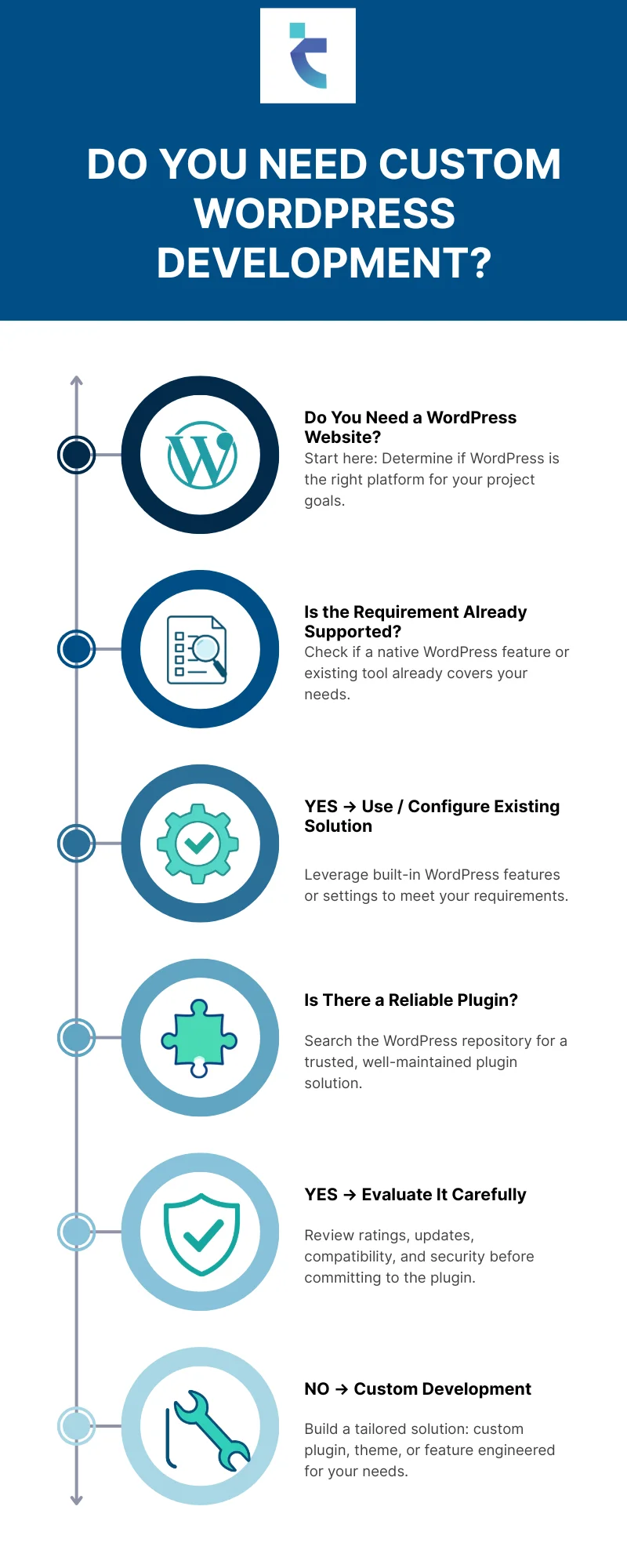 Custom development is often misunderstood. Some businesses assume every professional WordPress website needs to be completely custom-built. Others assume every requirement should be solved with an existing plugin.
Neither approach is correct.
Imagine a website needs a feature that is already handled reliably by a well-maintained plugin with an active development team, good security history, and an appropriate architecture.
Building that functionality from scratch may not be the smartest use of the budget.
Now imagine the business needs a proprietary workflow that no plugin handles correctly. Installing three different plugins to reproduce that workflow may create more problems than it solves.
That is where custom development can make sense.
The decision should be based on:
How to Actually Decide
| Requirement | > | Existing Solution | > | Compatibility |
| Security | > | Performance | > | Maintenance |
| ↓ Total Cost | ||||
Not simply:
Custom = better
or
Plugin = cheaper
WordPress Ecommerce Development Services
WordPress is also widely used for ecommerce through WooCommerce.
But installing WooCommerce is not the same as developing a successful ecommerce operation.
A simple store may only require products, payments, shipping, and basic customer accounts.
A more complex business may need product variations and complex catalogs, inventory synchronization, ERP integration, CRM integration, custom checkout workflows, subscription products, customer-specific pricing, shipping integrations, tax calculations, payment gateways, order automation, and custom reporting.
At that point, WordPress ecommerce development services become less about designing product pages and more about making multiple systems work together.
Full Stack WordPress Development
Full stack WordPress development covers both the frontend and backend sides of a project.
On the frontend, that can involve HTML, CSS, JavaScript, responsive interfaces, accessibility, and modern frontend frameworks.
On the backend, it can involve PHP, WordPress APIs, databases, custom functionality, authentication, integrations, and business logic.
Some projects go further and use WordPress as a headless CMS.
In a headless architecture, WordPress manages content while another application controls the frontend.
Headless WordPress Architecture
| Content Team |
| ↓ |
| WordPress |
| ↓ |
| REST API / GraphQL |
| ↓ |
| Custom Frontend |
| ↓ |
| Website / Application |
This can provide considerable frontend flexibility.
It can also introduce additional complexity.
A headless WordPress setup means more systems to develop, deploy, monitor, secure, and maintain. It should therefore be selected because the project genuinely benefits from that architecture, not because headless sounds more advanced.
What Is WordPress Local Development?
WordPress local development means building and testing a website in an isolated development environment instead of making changes directly on the live website.
This sounds like a technical detail, but it directly affects business risk.
Imagine changing a plugin on a live ecommerce website and discovering that the checkout has stopped working.
The problem is now affecting real customers.
A safer workflow looks more like this:
WordPress Development Pipeline
| LOCAL DEVELOPMENT |
| ↓ |
| DEVELOPMENT TESTING |
| ↓ |
| STAGING |
| ↓ |
| QA |
| ↓ |
| PRODUCTION |
| ↓ |
| MONITORING |
This allows developers to test changes before exposing them to visitors.
For larger projects, staging environments, version control, automated testing, backups, deployment processes, and monitoring can become important parts of the development lifecycle.
Is WordPress Outdated in 2026?
No. But that does not mean WordPress is automatically the right choice for every project.
This is an important distinction.
WordPress remains a major part of the web, but it operates in a more competitive environment than it did several years ago.
Businesses now have more options.
Hosted website platforms reduce technical responsibility. Website builders make visual editing easier. Ecommerce platforms can provide tightly integrated selling tools. Modern frontend frameworks make it easier to build highly customized applications.
So the better question is not whether WordPress has competitors.
It obviously does.
The better question is whether WordPress still solves the problems a particular business has.
For many businesses, it does.
WordPress remains attractive when a company wants control over its content, a flexible publishing system, ecommerce capabilities, custom integrations, and access to a large development ecosystem.
It becomes less attractive when the project is essentially a complex software application that happens to contain a few pages of content.
Did You Know?
A WordPress website can start as a simple content-management system and later become connected to CRMs, ERPs, payment gateways, inventory systems, marketing automation platforms, and custom applications.
That is why architecture matters before the website becomes complicated.
Why Are People Moving Away From WordPress?
There is no single reason. Different businesses leave WordPress for different reasons. Some want a fully managed platform where they do not have to think about updates, hosting, plugin compatibility, or infrastructure. Others have inherited WordPress websites with years of accumulated technical debt. A website may contain an old theme, dozens of plugins, custom code written by several developers, outdated integrations, and no documentation.
Eventually, even a small change becomes risky. The problem in that situation may not be WordPress itself. It may be the way WordPress was developed. There is another situation where moving away can make sense: when the project has become an application rather than primarily a content-driven website. If most of the development effort involves working around the CMS rather than using its strengths, another architecture may be more appropriate. The technology should follow the requirements.
Is WordPress Still Worth It in 2026?
For many businesses, yes. But “still worth it” depends on what you need from the platform.
WordPress can be a strong choice when your business needs a website that your own team can manage while retaining the ability to customize the platform later.
That can be particularly valuable for corporate websites, publishing websites, content-heavy websites, ecommerce stores, membership platforms, educational websites, lead-generation websites, and websites requiring custom integrations.
The strongest argument for WordPress is not that it has the largest ecosystem.
It is that a business can start with a relatively straightforward website and continue extending it as requirements become more sophisticated.
That flexibility is valuable. But flexibility comes with responsibility.
The more you customize a WordPress website, the more important architecture, documentation, testing, security, and maintenance become.
How AI Is Changing WordPress Development
AI has changed the development process, but it has not removed the need for developers.
A WordPress developer can now use AI to accelerate repetitive work such as generating boilerplate PHP, creating initial code structures, explaining unfamiliar code, generating test cases, debugging errors, creating WP-CLI scripts, and assisting with block development.
AI can also support content workflows and administrative tasks.
WordPress itself is moving further into the AI conversation through official experimentation and developer tooling.
The important distinction is between generating code and engineering a reliable system.
AI can produce code that looks convincing while still containing security vulnerabilities, inefficient database queries, incorrect permissions, poor error handling, or compatibility problems.
A developer still needs to determine whether the code is appropriate for the actual production environment.
The practical future is therefore not simply “AI replaces WordPress developers.”
It is closer to:
Developer + AI + testing + engineering judgment
That combination can make development faster without removing accountability.
WordPress Elementor: Is a Page Builder Still a Good Choice?
Elementor and other page builders have a legitimate place in WordPress development.
The question is not whether Elementor is good or bad.
The question is who will use the website after it launches.
If a marketing team needs to create and modify landing pages without involving developers every time, a page builder can provide substantial value.
If the website has a highly controlled design system and its structure rarely changes, a custom theme or block-based implementation may provide a better fit.
Performance should also be measured rather than assumed.
A page builder can add frontend assets, but a custom-coded website can also be badly developed and perform poorly.
The right question is:
“What implementation gives this particular website the best balance between editing flexibility, maintainability, performance, and development cost?”
That is a much more useful question than simply asking whether Elementor is fast or slow.
Professional WordPress Development: When Is It Worth Paying For?
You do not necessarily need professional development for every WordPress website.
If you are building a small brochure website with five pages, a contact form, and basic content, professional development may not provide enough additional value to justify the cost. The situation changes when the website becomes important to the business.
If it generates leads, processes transactions, connects to internal systems, contains custom workflows, handles sensitive customer information, or needs to remain operational with minimal downtime, technical decisions become significantly more consequential.
Professional WordPress development is essentially about reducing the cost of mistakes. A developer’s value is not simply measured by how quickly they can create a page. It is also measured by whether they can identify problems before those problems become expensive.
What Should WordPress Development Services Include?
A good project should begin with discovery rather than code.
Before development starts, the team should understand the business goals, target users, content structure, integrations, technical requirements, editing requirements, and expected future changes.
From there, the project may involve UX and UI design, information architecture, theme development, plugin development, WooCommerce development, API integrations, content migration, performance optimization, security, testing, deployment, and maintenance.
Not every project requires all of these services. A five-page business website should not be scoped like a WooCommerce platform connected to an ERP. That sounds obvious, but many development problems begin when every WordPress project is treated as though it follows the same template.
WordPress Development Agency vs WordPress Development Company
You will encounter both terms frequently when searching for help.
WordPress development agency and WordPress development company are not standardized technical classifications. They are business descriptions.
What matters is what the organization can actually deliver.
Instead of choosing an agency because it has the most impressive website, investigate how it approaches development.
Ask:
- Who will actually build the website?
- Who makes the architectural decisions?
- How are integrations handled?
- How is the website tested?
- Where is development performed?
- Who owns the code and accounts?
- How are updates managed?
- What happens after launch?
- And one particularly important question:
- “What happens if we stop working together?”
- Your website should remain yours.
You should retain appropriate access to your domain, hosting, website, analytics, third-party services, source code, and business data.
A good development relationship should reduce dependency, not deliberately create it.
How to Choose a WordPress Development Agency
Look beyond the sales presentation.
Ask to see real projects.
Then visit those websites yourself.
If an agency claims expertise in ecommerce, look at its ecommerce work. If it claims expertise in custom integrations, ask how those integrations were architected. If performance is important to you, ask how performance is measured and what happens when a page fails to meet the agreed requirements.
You should also ask how the agency handles changes after launch.
A website is not finished simply because it has been deployed.
WordPress, plugins, hosting environments, browsers, integrations, and business requirements all change.
The agency should have a clear answer for what happens next.
A Real Techesprit Example
A useful way to understand professional WordPress development is to look at a real project rather than an invented scenario.
One Techesprit case study involved a website with structural problems and technical bottlenecks. The project also required CRM integration, sales-system improvements, WordPress SEO work, ongoing platform enhancements, and plugin customization.
The objective was not simply to put another WordPress website online.
The challenge was to make the existing platform work better as the business grew.
From Existing Site to Growth-Ready Platform
| Existing Website |
| ↓ |
| Structural Problems |
| ↓ |
| Technical Bottlenecks |
| ↓ |
| CRM Integration |
| ↓ |
| Plugin Customization |
| ↓ |
| Sales System Improvements |
| ↓ |
| SEO & Platform Enhancements |
| ↓ |
| A More Capable Platform for Growth |
The important lesson is that not every WordPress problem requires a complete rebuild.
Sometimes the better approach is to understand what is already working, identify the technical bottlenecks, fix the underlying architecture, and develop the functionality that is actually missing.
You can explore the real projects on Techesprit’s case studies
How Much Does WordPress Development Cost?
There is no useful universal price for WordPress development.
A five-page company website and a large WooCommerce operation can both be described as “WordPress websites,” but the engineering requirements are completely different.
The cost can be affected by the design, number of templates, content migration, custom theme work, custom plugins, integrations, ecommerce requirements, user roles, search functionality, performance requirements, security requirements, testing, hosting, and ongoing maintenance.
This is why comparing WordPress development proposals solely by price can be misleading.
A cheaper proposal may simply contain less scope.
For example, one proposal might include migration, testing, staging, performance optimization, training, and post-launch support, while another may only include the initial website build.
The useful comparison is therefore:
“What am I receiving for the price?”
not:
“Which number is smaller?”
WordPress Maintenance: What Happens After Launch?
Launching the website is not the end of development.
It is the beginning of operations. WordPress websites require ongoing attention because the platform, plugins, themes, hosting environments, browsers, integrations, and security landscape continue to change. Ongoing WordPress maintenance, specifically, is the part nobody budgets for and everybody needs. Patchstack’s own vulnerability tracking recorded 11,334 new WordPress vulnerabilities in its most recent annual report, up from 7,966 the year before, the large majority found in third-party plugins rather than WordPress core itself.
A sensible update workflow looks like this:
WordPress Update Process
| New Update |
| ↓ |
| Review |
| ↓ |
| Backup |
| ↓ |
| Test |
| ↓ |
| Check Compatibility |
| ↓ |
| Deploy |
| ↓ |
| Monitor |
The goal is not to update everything blindly as soon as an update appears.
The goal is to keep the website current without introducing unnecessary risk.
Should You Rebuild Your WordPress Website?
Not necessarily.
A slow website does not automatically need a new theme.
A website with plugin conflicts does not automatically need to be rebuilt.
A site with poor Core Web Vitals does not automatically mean WordPress is the problem.
- Before rebuilding, investigate the actual cause.
- It could be the hosting environment.
- It could be poorly written custom code.
- It could be excessive third-party scripts.
- It could be a database problem.
- It could be an inefficient theme.
- It could be plugin conflicts.
- It could be poor image handling.
- It could be inadequate caching.
- It could be outdated infrastructure.
- A rebuild should have a reason.
The website is old” is not, by itself, a technical reason.
When WordPress May Not Be the Right Choice
WordPress is flexible, but flexibility does not mean it should be used for everything.
If you are building a sophisticated SaaS product with real-time application behavior, complex data processing, advanced application logic, and little need for traditional content management, a dedicated application architecture may make more sense.
Likewise, if a project requires so many custom workarounds that the development team spends most of its time fighting the CMS, that is a signal worth taking seriously.
The best technology is not necessarily the most popular one.
It is the one that solves the requirements with an acceptable level of complexity, cost, maintainability, and risk.
What Should a Business Decide Before Building a WordPress Website?
Before choosing a theme, plugin, page builder, or agency, answer a few fundamental questions.
What does the website actually need to accomplish?
Who will manage the content?
Which systems need to communicate with it?
Which functionality is standard and which is genuinely unique?
Which parts need to be easy for non-technical staff to edit?
What happens if traffic increases significantly?
What happens if an important plugin stops being maintained?
Who will maintain the website after launch?
These questions are much more valuable than starting the project by asking which WordPress theme looks best.
What Is Changing in WordPress in 2026?
WordPress development continues to move beyond the traditional model of PHP themes plus a collection of plugins.
The block editor and modern site editing capabilities continue to evolve. Developer APIs are expanding. AI-assisted workflows are becoming more relevant. WooCommerce continues to support sophisticated ecommerce implementations. Headless WordPress remains an option for organizations that need a separate frontend architecture.
The result is that WordPress development is becoming more varied.
A developer working on a modern WordPress project may need to understand traditional PHP development, JavaScript, REST APIs, block development, performance engineering, security, third-party integrations, deployment workflows, and AI-assisted development.
That does not mean every WordPress website needs all of those technologies.
It means the platform is capable of supporting a much wider range of projects than the traditional “blog + theme + plugins” model suggests.
CRO: Need Help Deciding What Your WordPress Project Actually Needs?
The right solution depends on what your business needs the website to accomplish, and where the current platform is creating problems.
If you are planning a new WordPress website, or dealing with an existing one that has performance, integration, functionality, or maintenance problems, start with the requirements rather than the technology.