
Website maintenance is the ongoing process of keeping a website secure, fast, and fully functional after it goes live. It is not a one-time task. It is a continuous cycle of updates, monitoring, fixes, and improvements that ensures your website stays reliable for users and search engines.
For most businesses, a website is the first point of contact with customers. If it slows down, breaks, or becomes unsafe, it directly affects trust and conversions. That’s why website maintenance is just as important as website development.
This guide breaks down exactly what website maintenance includes, using a practical approach based on real-world website operations.
What Website Maintenance Really Includes
Website maintenance covers multiple technical and content-related areas. It is not limited to updates or backups.
At a core level, it includes:
- Software and plugin updates
- Security monitoring and protection
- Website backups and recovery planning
- Website performance optimization
- Website speed optimization
- Content updates and corrections
- Technical SEO improvements including Core Web Vitals
Each of these plays a different role in keeping a website stable and competitive.
Website Maintenance Checklist
A proper website maintenance checklist is structured around frequency and risk level. Not all tasks need to be done daily, but none should be ignored long-term.
Weekly Maintenance Tasks
- Check website uptime and downtime logs
- Monitor security alerts and suspicious activity
- Test forms, checkout pages, or lead capture systems
- Review basic traffic changes in analytics
Monthly Maintenance Tasks
- Update CMS, plugins, and themes
- Fix broken links and redirect errors
- Optimize images and database performance
- Review page speed and Core Web Vitals
- Scan for malware or vulnerabilities
Quarterly Maintenance Tasks
- Full website backup review and restore testing
- UX improvements based on user behavior
- Content updates for outdated information
- Technical SEO audit
Annual Tasks
- Hosting performance review
- Security policy review
- Design refresh or structural improvements
This structure ensures maintenance is proactive rather than reactive.
Website Maintenance Services: What They Actually Cover
When businesses hire website maintenance services, they are not just paying for updates. They are paying for continuous stability and risk prevention.
Typical services include:
- Continuous website monitoring
- Security patching and firewall management
- Backup management and recovery support
- Performance optimization and load speed improvements
- Bug fixes and technical troubleshooting
- Plugin and system compatibility management
In our experience managing websites, the biggest value comes from early detection. Most major website issues start as small unnoticed problems like outdated plugins or slow-loading scripts.
Website Security Maintenance: Protecting Your Digital Asset
Security is one of the most critical parts of website maintenance.
Security maintenance typically includes:
- Regular software updates
- Malware scanning and removal
- Firewall configuration
- Login protection and two-factor authentication
- Removal of unused plugins and themes
- Monitoring suspicious traffic patterns
A common issue seen across many websites is outdated components. Even a single outdated plugin can become a security risk if not updated regularly. Many of these vulnerabilities stem from website development mistakes that go unaddressed after launch.
Website Backups: Why They Are Non-Negotiable
A website backup is a complete copy of your website that can be restored if something goes wrong.
A proper backup system includes:
- Automated daily or weekly backups
- Offsite storage (not on the same server)
- Multiple restore points
- Regular restoration testing
Many websites have backups configured but never test them. That creates a false sense of security.
Website Performance Optimization: More Than Just Speed
Website performance optimization focuses on improving how efficiently a website loads and responds to users.
It includes:
- Reducing server response time
- Optimizing images and media files
- Minimizing CSS and JavaScript files
- Using caching systems
- Reducing third-party scripts
Performance is not only about user experience. It also impacts search rankings and conversion rates. You can measure your site’s performance using Google PageSpeed Insights, a free tool that analyzes both mobile and desktop versions of your pages.
Website Speed Optimization: What Actually Works
Website speed is often misunderstood as a single technical fix. In reality, it is a combination of many small improvements.
Effective methods include:
- Using modern image formats like WebP
- Enabling browser caching
- Reducing unnecessary plugins
- Using a content delivery network (CDN)
- Improving hosting infrastructure
A common issue seen during maintenance work is plugin overload. As websites grow, extra plugins are added without removing old ones, which slows down the entire system.
Core Web Vitals and Why They Matter
Core Web Vitals are Google’s performance metrics that measure user experience.
They include:
- Largest Contentful Paint (LCP): loading speed, should occur within 2.5 seconds
- Interaction to Next Paint (INP): interactivity, should be under 200 milliseconds
- Cumulative Layout Shift (CLS): visual stability, should score less than 0.1
Websites that perform poorly in these areas often struggle with rankings and user retention. You can monitor your site’s Core Web Vitals directly inside Google Search Console, which provides real-world usage data grouped by URL and device type.
Content Updates as Part of Maintenance
Website maintenance is not only technical. Content also needs regular updates.
This includes:
- Updating service pages or product details
- Fixing outdated information
- Improving clarity and readability
- Adding new FAQs based on user queries
Search engines prefer websites that stay updated and relevant. Stale content can reduce visibility over time. A structured SEO strategy ensures your updated content continues to rank and reach the right audience. Google’s Search Central documentation explains how regularly updated, high-quality content supports better crawling and indexing.
A Simple Framework for Understanding Website Maintenance
To make website maintenance easier to understand, it can be grouped into four key areas:
1. Stability
Ensuring the website stays online and functional (Uptime monitoring, backups, hosting reliability)
2. Security
Protecting the website from threats (Updates, firewalls, malware scanning)
3. Performance
Keeping the website fast and efficient (Speed optimization, Core Web Vitals improvements)
4. Visibility
Maintaining search engine performance (SEO checks, content updates, technical fixes alongside broader digital marketing efforts)
This structure helps prioritize tasks instead of treating maintenance as random fixes.
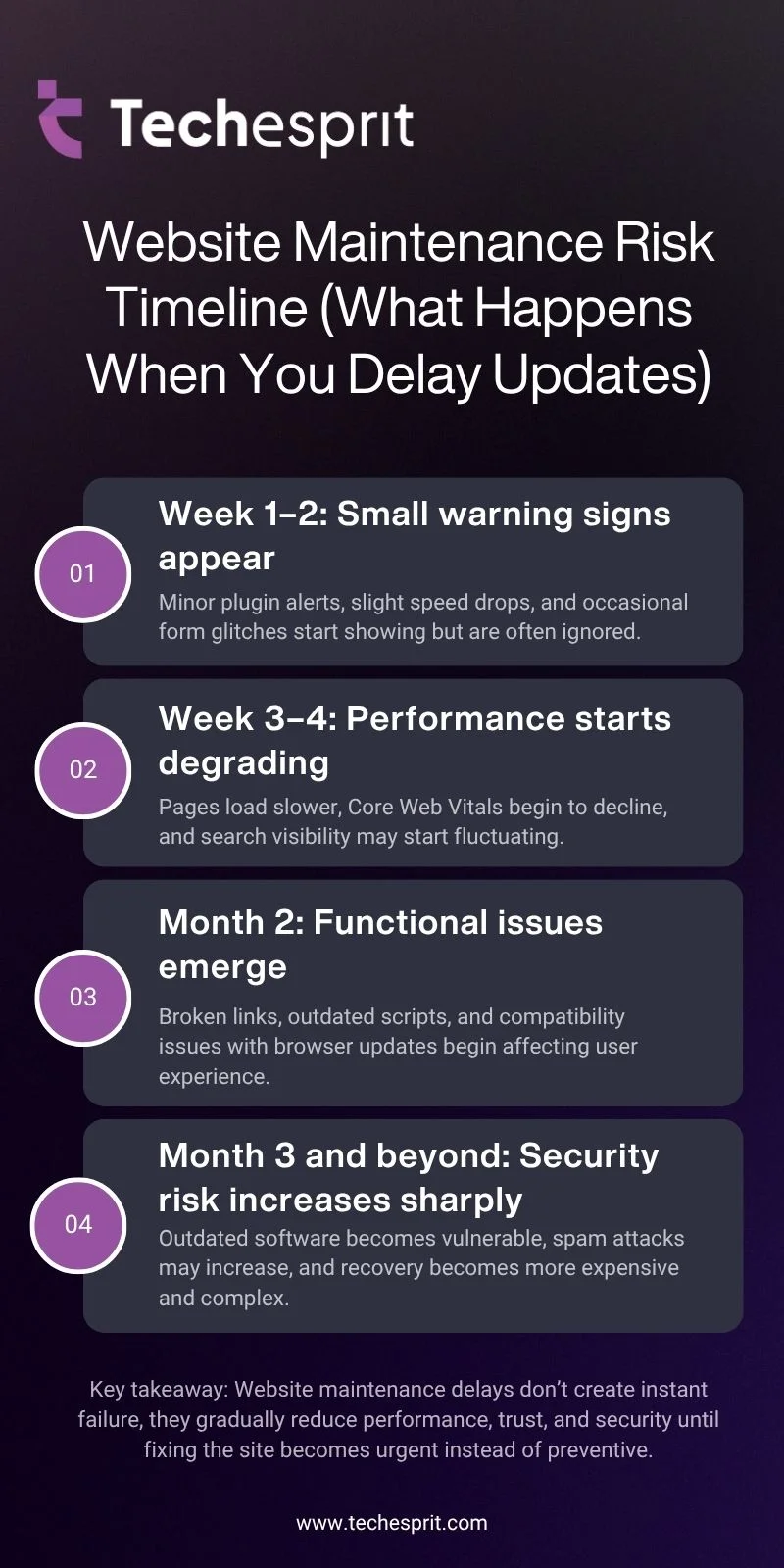
Website Maintenance Risk Timeline (What Happens When You Delay Updates)
Common Problems Caused by Poor Website Maintenance
When website maintenance is ignored, problems build up over time:
- Slow loading pages
- Broken links and missing pages
- Security vulnerabilities
- Declining search rankings
- Poor user experience
These issues usually do not appear suddenly. They develop gradually and become noticeable only when performance drops significantly.
When Should You Focus More on Maintenance?
Every website needs maintenance, but some require it more frequently:
- E-commerce websites
- Business lead generation websites
- High traffic blogs or news platforms
- Websites with frequent content updates
If a website plays a direct role in generating revenue or leads, maintenance becomes essential rather than optional.
Conclusion
Website maintenance is not optional. It is the ongoing work that keeps a website secure, fast, and usable. Without it, even a well-designed website will slowly lose performance and trust. A structured approach covering security, performance, backups, and updates ensures your website continues to support your goals instead of becoming a liability.
If your website is important to your business or audience, maintenance should be treated as a core responsibility, not an afterthought.
FAQs
How often should website maintenance be done for a typical business site?
Website maintenance should be done continuously, but most business sites need weekly checks for uptime and security, plus monthly updates, optimization, and performance reviews to stay stable and reliable.
What happens if I don’t update plugins or CMS regularly?
Outdated plugins or CMS versions can create security gaps, slow performance, and compatibility issues. Over time, they may even break website features or expose sensitive data to potential threats.
Can website maintenance improve search engine rankings?
Yes, regular maintenance improves technical SEO, page speed, and Core Web Vitals. These factors directly affect rankings, helping search engines better crawl, understand, and rank your website content.
Is website maintenance only needed for large or complex websites?
No, even small websites need maintenance. Every site depends on software, hosting, and security layers that require updates. Ignoring them can still lead to downtime or performance issues.
What is the difference between website maintenance and website redesign?
Website maintenance focuses on keeping the existing site functional and secure. A redesign changes layout, structure, and user experience, usually done when branding or usability needs major improvement.